
I used to think that I love coding, but in the last year, I came to realize that what I love more is building - creating something useful and beautiful. Last year this time, my coding workflow was to fire up VS Code with Claude in the browser or GitHub Copilot in ‘Ask’ mode and brainstorm with a model, review solutions suggested by the LLM, copy code into the editor, test and deploy🚀. This was fun in the beginning, but soon the context-switching became tedious and broke the flow of building.
Then I started exploring agentic coding - starting in VS Code with Copilot ‘Agent’ mode, then using CLI agents like Claude Code, Codex, and most recently Gemini and Open Code. At first, it was all fun, then I went back and forth the reactions: ‘this is fun’, ‘but I miss writing code’, ‘this code is terrible’. All the terms - tools, MCP servers, commands, hooks, skills - were confusing and hard to keep up. But once I dug a little deep, learned the best practices and understood how they all fit together agentic coding became faster and more effective than coding without it. And the best part…
I didn’t lose the joy of coding - I just built more.
My personal projects took off, especially HN Companion that George and I have been working on. We built multiple assets almost entirely with agentic coding - the landing page, web app, and a custom skill hn-summarizer - all in production and in the open source world.
It taught me that these tools are worth learning and using. So I’m writing this post to break down the concepts that confused me at the beginning. The way I think about it now: there are three layers to agentic coding - the foundation (agents, models, and tools), the extensions (skills, commands, hooks), and the integrations (MCP, plugins). Let’s start with the foundation.
Note: All agentic systems name these concepts slightly differently; I’ve used Claude as the reference since that’s what I know best and use the most. Once you understand the concepts, you can easily find the parallels in other systems.
Foundations
Agentic coding
Autonomous coding process where AI writes, debugs, modifies and deploys code autonomously with minimal human intervention. The alternate method was the chat-based interface where the human gets information / guidance from the AI and the human writes the code.
Agents
AI systems that can understand the environment that it is operating in, make decisions and take actions autonomously.
Coding agents analyze code, plan solutions, write code, test it and deploy it - in a loop until all the tasks are completed. They are highly context-aware, compose multiple tools to accomplish complex tasks, operate independently, and iterate continuously until completion. They do a task, test their changes, observe the results, refine their approach, rinse repeat.
Examples of coding agents - Claude Code, GitHub Copilot CLI, OpenAI Codex, Gemini CLI, Open Code
Agents operate by working in three phases - gather context, take action and verify results - in a continuous loop until the task is complete. This the agentic loop.
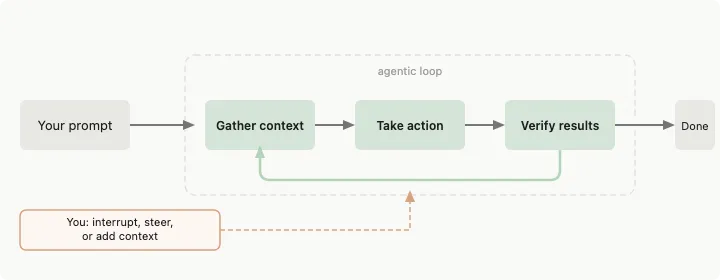
Humans can intervene this loop at any point and steer the agent to take a different path. You can interact with the agent through text instructions, or attach images - all of which go into the context window as input tokens.
Agentic loop is accomplished by two components - Models and Tools.
Models
The underlying LLMs (Claude Opus 4.5, GPT-5.2, Gemini 3 Pro, etc.) that understands code, reasons about the tasks, breaks down complex tasks into smaller tasks, plans the execution and adjusts it based on results.
Tools
Things that agents use to take actions - this is the heart of agentic coding. Throughout the agentic loop, the agents choose the tools that are appropriate for the type and complexity of the task.
Examples: file ops (read, write files), web search, run shell commands (bash, git, node, etc.), browse the web (navigate to pages and read them)
The result of using each tool gives information that is fed back into the agentic loop and informs the next decision by the agent. There are built-in tools and you can build your own tools in different ways - skills, MCP, subagents and hooks. See below.
Extensions
The built-in models and tools in the foundation cover most of the coding tasks. But the agents provide extension layers to expand and/or customize these capabilities.
AGENTS.md / CLAUDE.md
Project-level or user-level configuration file containing persistent instructions, preferences, and context that loads at session startup. See more at Claude documentation
Rules
Constraints, preferences and guidelines defined in AGENTS.md or its equivalent.
Commands
In addition to detailed text instructions, you can use slash commands - special instructions prefixed with /. Some are built-in agent controls like /usage, /clear, /help that control the agent itself. But you can also create custom slash commands (see skills below). They’re invoked with /<command-name> and are well-defined and documented.
Skills
Instructions and workflows that are loaded that are used throughout the current session. Skills can include executable scripts in any language (Python, JS, Bash) that the agent runs directly. Script output feeds back into the agentic loop.
- Unlike the instructions in AGENTS.md which are loaded at the beginning of the session, skills are loaded on-demand. Skills can be invoked explicitly through a slash command, /explain-code or automatically based on the context Explain this code to me.
In Claude, skills are loaded in three levels:
- metadata is loaded at startup time and included in the system prompt
- instructions
SKILL.mdare loaded when triggered (automatically by the model or manually by the user) - references are loaded only when referenced
Subagents
Isolated workers that execute tasks separate from your main context and returns only the summary. This helps prevent intermediate tasks from filling up or polluting the main context. Read more about it at Claude Subagents.
Hooks
deterministic scripts that run on pre-defined lifecycle events and can be used to automate workflows. Example - run lint before every commit. This is similar to git hooks and there is no LLM involved.
Integrations
MCP
It is an open standard that connects agents to external tools and data sources like databases, APIs, and authenticated systems. You add MCP servers with commands like claude mcp add, and once connected, the agent can query databases, pull from issue trackers, or integrate with services like GitHub, Sentry, or Slack—all through natural language requests.
Plugins
Packaging mechanism to bundle multiple entities including commands, hooks, subagents and MCP servers into a single deployable unit.
When to Use What?
This is how I would go about adopting the agentic coding workflow - in a progressive manner. Claude docs provide an extensive comparison of these features at Extend Claude Code.
Start with the foundation: Get comfortable with basic agent interactions and tools before diving into extensions.
AGENTS.md first: Define your project-level preferences and patterns here. This runs every session.
Skills for repetition: If you’re doing the same workflow multiple times, make it a skill. Good candidates: code review patterns, documentation generation, testing workflows.
Hooks for automation: When something should always happen at a specific point (pre-commit, post-deployment), use hooks.
MCP for external systems: When you need to connect to databases, APIs, or authenticated services, use MCP.
Subagents for isolation: When a task is complex and would clutter your main context (like “research and compare 5 approaches”), spin up a subagent.
Plugins for sharing: When you have a complete workflow you want to share with your team or across projects, package it as a plugin.
Wrapping Up
If you’re just starting out, don’t try to learn everything at once. Start with basic agent interactions, add an AGENTS.md file with your preferences, and gradually layer in skills and MCP servers as you find patterns worth automating.
The tools are changing fast, but the core concepts are fairly stable. Once you understand how they fit together, you can adapt to whatever comes next. Now go build something.
References
- Claude Code: https://code.claude.com/docs
- GitHub Copilot CLI: https://github.com/features/copilot/cli
- OpenAI Codex ClI: https://developers.openai.com/codex/cli/
- Gemini CLI: https://geminicli.com/docs/
- OpenCode: https://opencode.ai/
- Best practices for Claude Code: https://code.claude.com/docs/en/best-practices
Comments