
I have been thoroughly enjoying working on ReactNative projects, but was disappointed by the lack of a good debugging environment. I had tried multiple solutions like Nuclide (which I found it to be very slow), WebStorm with JSX plugins (which is mainly syntax recognition). So I had to always launch the app from Xcode/Android Studio, then attach Chrome Dev tools and keep switching between all three for debugging. This was frustrating, but there is hope…
ReactJS conference in February announced the release of ReactNative extension for VisualStudio Code, the lightweight editor by Microsoft. The name ‘Visual Studio’ may sound heavy, but VS Code is a completely new editor built from ground-up based on Electron. It is super fast, flexible, configurable and Open Source too! The ReactNative extension for VS Code supports intellisense, ability to run react-native commands and most importantly, full-fledged debugging experience - yeah yeah breakpoints, call stack and stuff :-)
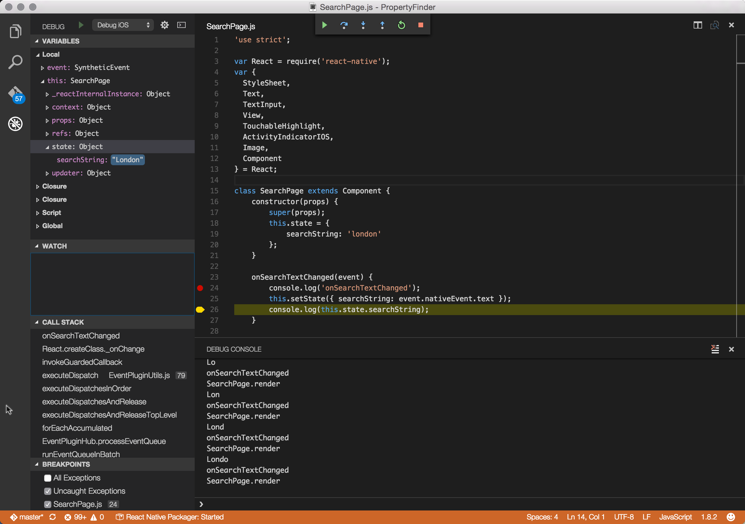
I tried to code this ReactNative tutorial by Ray Wenderlich in VS Code using this extension and it was absolutely brilliant. The UI is very clean, clutter-free with subtle yet vivid colors. As soon as I opened the starter project, it recognized that it is a ReactNative project and got it ready to go. Then I simply put a breakpoint and hit the Debug Run button and Viola! - my app started and the breakpoint was hit. I can step through code, inspect callstack, local variables, debug console etc. all in one place!
Comments
Archived Comments
Previously hosted on Disqus
Well, you must be one of the lucky. I couldn't make it run :(
Hey Neil, I just came across a new article that describes how to set up VSCode for ReactNative and I remembered this comment from you 6 months ago and thought you may find it interesting / useful. I haven't tried the set up yet, but hopefully it will work for you. https://medium.com/react-na...
Hi Ann Catherine, thanks for the follow up. It motivated me to have a fresh start with react-native. The issue remains: I cannot debug iOS apps in Simulator. VSCode simply does not stop at breakpoints.
PS: Tried again, enabled debugging (whith CMD_D --shame on me--) --- works :)